
Designers as Choice Architects: Nudging to Enhance Task Efficiency in Activity-Centered Interface Design
Copyright ⓒ 2025 The Digital Contents Society
This is an Open Access article distributed under the terms of the Creative Commons Attribution Non-CommercialLicense(http://creativecommons.org/licenses/by-nc/3.0/) which permits unrestricted non-commercial use, distribution, and reproduction in any medium, provided the original work is properly cited.

Abstract
This study positions designers as choice architects and investigates how behavioral nudges can be strategically applied to interface design in order to improve task efficienc in activity-centered design (ACD). Addressing users with varying levels of diverse digital proficiencies, the research draws on theories from cognitive psychology, behavioral economics, and human-computer interaction theory to examine key design strategies such as choice architecture, nudge mechanisms, signifiers, feedback, and constraints. It examines how these components, when integrated into a taskonomic structure, align with users’ mental models to support goal-oriented activity and reduce cognitive load. Through a quantitative and qualitative case analysis of self-service kiosk, the study assesses how such design factors intuitively guide user behavior. Findings reveal that strategic nudges—such as default settings, progress indicators, and visually salient cues—are effective in minimizing decision friction, enhancing situational awareness, and reducing errors. In conclusion, the strategic application of signifiers, feedback, and constraints offers a powerful design framework for seamlessly guiding user interactions in high-frequency, goal-oriented digital environments.
초록
본 연구는 디자이너를 선택 설계자(choice architect)로 정의하고, 행동 유도 기법인 넛지(nudge)를 인터페이스 디자인에 전략적으로 적용하여 활동 중심 설계(Activity-Centered Design, ACD) 환경에서 과업 효율성을 향상시킬 수 있는 방안을 탐색한다. 다양한 디지털 역량을 지닌 사용자를 고려하여, 인지 심리학, 행동 경제학, 인간-컴퓨터 상호작용(HCI) 이론을 바탕으로 선택 설계(choice architecture), 넛지 메커니즘, 시지파(signifier), 피드백(feedback), 제약(constraint) 등 주요 디자인 요소를 분석하였다. 이들 요소가 테스크노믹(taskonomic) 구조와 결합될 경우, 사용자의 정신 모델과 정렬되며, 목표 지향적 활동을 촉진하고 인지 부하를 효과적으로 경감시킬 수 있음에 주목하였다. 셀프 키오스크를 대상으로 수행한 정량적 및 정성적 사례 분석을 통해, 기본값 설정, 진행 표시기, 시각적 단서 등의 전략적 넛지가 직관적인 사용자 행동을 유도하는 데 효과적임을 확인하였다. 이러한 요소들은 의사결정 과정의 마찰을 줄이고, 상황 인식을 강화하며, 오류 발생 가능성을 최소화하는 데 기여하였다. 결론적으로, 시지파·피드백·제약을 넛지 전략으로 통합하여 설계하는 접근은 고빈도·목표 지향적 디지털 환경에서 사용자의 작업 성공률을 높이는 핵심적 설계 방식으로 기능함을 밝히며, 본 연구의 학술적·실무적 의의를 제시한다.
Keywords:
Choice Architect, Nudge, Activity Centered Design, Human-Computer Interaction, Interface Design키워드:
선택 설계자, 넛지, 활동 중심 디자인, 인간–컴퓨터 상호작용, 인터페이스 디자인Ⅰ. Introduction
In the evolving landscape of human-computer interaction, digital interfaces are increasingly challenged to support diverse users while ensuring cognitive ease and functional reliability. Activity-Centered Design (ACD) offers a compelling framework by shifting focus from individual user identities and preferences to the structure and logic of the activity itself. Rather than designing interfaces based on whom the user is, ACD prioritizes what the user needs to accomplish, allowing ‘the activity to define the product and its structure’, and promoting logical workflows, intuitive sequences, and system affordances that support purposeful action[1].
This paradigm proves especially effective in public-facing systems, where users vary widely in background, language and familiarity but share a common, clearly defined goal[1]. In such contexts, ACD enables a more inclusive and scalable solution by reducing unnecessary cognitive load, promoting error-resistant navigation, and accommodating varying levels of digital fluency.
Central to this study is the concept of choice architects – those who structure the decision-making environment to guide user behavior[2]. By leveraging key design strategies like signifiers, designers influence how users perceive and engage with system options, nudging them toward correct or efficient actions. Such micro-level design decisions shape not only usability but also task success.
This paper builds on a multidisciplinary foundation, drawing from cognitive psychology, behavioral economics, and interaction design. Theoretical frameworks such as Choice Architects, Nudge, Dual Process Cognitive Theories, and Signifiers are explored to understand how taskonomic interface design affects perception, minimizes cognitive strain, and enhances user performance in activity-centered tasks.
To investigate these concepts in practice, this study employs a mixed-method approach: (1) a quantitative user survey measuring three variables - perceived usability, decision clarity, and task efficiency, and (2) a qualitative case analysis of interaction design patterns in existing self-service kiosk, focusing on how design elements, such as signifiers, feedback, and constraints shape user behavior and support activity-centered interactions. Together, these methods aim to demonstrate how ACD and nudging principles, when thoughtfully applied, can improve activity focus interface design and support better outcomes in public digital systems.
Ⅱ. Literature Review
2-1 Designer as Choice Architects - The Role to Nudge
The concept of Choice Architect, originating from behavioral economics, refers to the structuring of environments to influence decision-making in a way that promotes beneficial outcomes without limiting individual freedom of choice[2], similar to the architect of a building influences occupant behavior through the strategic arrangement of structural elements[3]. In the context of interface design, designers act as choice architects by shaping the context in which users make decisions[2], shaping outcomes by determining how options are presented, sequenced, or emphasized. Through the strategic use of design elements, designers inherently influence user action, and such structuring of choice is referred to as Choice Architecture[2]. This aligns with the understanding that there is no truly neutral design, as all interfaces impose some form of structure or constraint, whether intentional or not.
‘It is a common misconception that people only need more data to make better decisions’[4]. Given that users often face time pressure, limited resources, and cognitive capacity, they rely on heuristics, simplifications and environmental cues to base their decisions on[4]. Choice architecture helps guide individuals toward simplifications in an effective way or to steer people from using unfit simplifications[4]. Even seemingly minor design details can have significant impacts on user behaviors[2]. While Choice Architecture is concerned with all design elements that shape decision-making, including defaults, sequencing, grouping, visibility, and layout, Nudges are the small features or behavioral influences within Choice Architecture that predictably influence behavior in a positive or goal-aligned way. Nudging draws on insights from behavioral economics, cognitive ergonomics and psychology to improve individuals’ decision-making[4]. Nudges are not mandates; rather, they serve as non-coercive mechanisms for influencing behavior. Rooted in libertarian paternalism, nudging represents an underlying behavioral intervention strategy to influence people’s judgment, choice or behavior when ‘cognitive boundaries, biases, routines and habits in individual and social decision-making pose barriers for people to perform rationally in their own declared self-interests’[5]. Nudges take advantage of users’ habits, routines, and perceptual shortcuts, making them especially effective in mass-use, public-facing systems where time and digital fluency may vary widely.
Common examples in interface design include default selections[6],[7], friction-based constraints[8], progress indicators, pre-selections, and visual emphasis on recommended actions. These mechanisms are instrumental in enhancing task efficiency and improving usability for diverse user groups.
Within the framework of ACD, nudges represent a practical strategy for supporting goal-oriented user behavior and effectively reducing cognitive load. Designers, as choice architects, implement nudges not merely to shape behavior, but to promote task success - particularly in contexts where the user’s objective is shared and clearly defined. The act of nudging, per se, makes the pathway through a task more intuitive, legible, and less prone to error.
2-2 Dual-System Decision Making
Human decision-making is often neither rational nor consistent over time[4]. This reality is well captured by the Planner-Doer Model, which frames individuals as two semi-autonomous selves: a long-term, reflective planner focused on future goals and a short-term, impulsive doer driven by immediate gratification[2]. This internal conflict mirrors the cognitive structure in Dual Process Cognitive Theories (DPTs), suggesting that the human brain functions in two kinds of thinking: one that is fast, automatic, emotion-driven (System 1), and another that is slower, reflective and analytical (System2)[5].
The planner aligns with System 2, while the doer operates through System 1, responding with minimal cognitive effort and emotion-based judgments[9],[10]. This tension contributes to present bias, prioritizing immediate rewards over long-term goals[11], resulting in time-inconsistent decisions that require interventions to support long-term interests[4].
Choice architecture emerges as a response to this cognitive dynamic between long-term planning and short-term impulses by reducing friction in decision-making. Within ACD, this approach is particularly valuable, as it prioritizes task efficiency and shared activity structures over individual preference. By embedding well-structured task flows and nudging mechanisms, designers can minimize cognitive strain and reinforcing behaviors that align with the intended activity. This highlights the importance of a design methodology that not only accommodates real-world activities but also reinforces goal-aligned behavior through strategic structuring, precisely the function ACD is meant to fulfill.
2-3 Activity-Centered Design (ACD)
While understanding specific users is critical, designs intended for broad audiences, such as utensils, sporting equipment, cameras, and automobiles, often work effectively across diverse user groups. These products may vary slightly across cultures but are, on the whole, more similar than not due to their focus on common, goal-directed activities. Their success stems primarily from two factors: one, ‘the activity-centered nature, and two, the communication of intention from the builders and designers’[12].
ACD closely parallels Human Centered Design and shares many of its fundamental principles, including a strong emphasis on understanding users[12]. However, ACD extends further by requiring a comprehensive understanding not only of users, but also of the underlying technology and the motivations driving the activities being performed[12]. Despite technological advancements, many systems still remain unfriendly, unintuitive, culturally biased, and challenging to use[13]. This challenge has prompted growing recognition – particularly as the field of human-computer interaction matures – of the need to shift toward context-based and activity-centered design strategies[14]. These approaches aim to accommodate broader public needs by focusing on shared tasks rather than individual differences[1].
ACD proposes that the structures and functions of a product should emerge directly from the activity it supports[1]. This means that the design emerges directly from the goals, sequences, constraints and context of the activity being performed, rather than from abstract notions of user profiles. This approach reduces cognitive load by aligning interface logic with task flows, making task flows more intuitive. It emphasizes that ‘design must address the entire activity under consideration’[15].
One design implication of organizing and designing interface structure is the distinction between Taxonomic and Taskonomic routes[16]. The Taxonomic route organizes information into logically structured categories based on what things are[16], such as means labeled as ‘Flights’, or ‘Hotels’ on a travel website. It is most effective for users who are already familiar with the system and know exactly what they are looking for. In this case, users must first identify the appropriate category before taking action. In contrast, the Taskonomic route takes on an approach to reflecting activity structure, based on the tasks the users wish to accomplish, rather than by types of objects or functions[17]. A Taskonomically designed website might present goal-oriented options such as ‘Plan a Trip’ and ‘Build Itinerary’, providing a more intuitive experience that follows users’ natural workflow – especially for novice or goal-directed users.
Dougherty and Keller argue that humans conceptualize the world based on the task at hand, not on fixed categories. Labeled categories often reflect broad conceptual relevance that may not align with the specific demands of a given task[18]. Predefined labels may lack nuanced details required for effective action in task-based environments[18]. Successful designs align seamlessly with the underlying activity, offering intuitive, action-oriented support[12]. Interfaces shaped around real tasks, rather than rigid classifications, enable users to produce knowledge through interaction. This reinforces the central tenet of ACD: tools must evolve around situated, practical use and mirror the structure of the activity, not merely the preferences of the user.
2-4 Signifier and Design for Expected Error
While ACD provides the foundational structure for aligning systems with user tasks, its success also depends on how effectively interaction cues are embedded within the interface. These cues play a critical role in enhancing the discoverability of system functions and guiding user behavior by making possible actions more intuitive and perceptible[1]. ‘Choice architects influence behavior when particular attributes are made more or less salient’[3], signifiers and feedback can function as nudging tools that subtly influence user decisions without coercion.
Signifiers and feedback are perceptible cues, such as visual, textual, or tactile indicators that communicate how users should interact with a system[1]. They serve as a vital bridge between the system and the user, guiding interactions, reducing ambiguity, and enhancing task efficiency by aligning users’ perceptions with the intended functionality. While affordances define what actions are possible, signifiers clarify how those affordances can be accessed or executed. Additionally, the presence of feedback makes possible the interactive two-way flow of information, in the form that is readily interpreted[10]. Embedded as ‘knowledge in the world‘, signifiers and feedback are deliberately designed to lower cognitive load and reinforce appropriate behavior, bridging the gap between the designer’s intent and the user’s mental model[19]. To be effective, these cues must be perceivable[1], often taking the form of signs, labels, or diagrams, indicating the correct course of action. Thoughtful placement of such cues not only supports navigation but also contributes significantly to error prevention, especially under time pressure or when users are unfamiliar with the system. By clarifying the correct path of action, they reduce the likelihood of errors and support goal-directed behavior. They do not only guide behavior but actively reinforce task success, aligning closely with the goal of nudging users towards better outcomes without coercion. They form part of a continuous, silent conversation between the designer and the user, mediated through the interface[1],[20].
What is frequently dismissed as ‘human error’ is more accurately the result of ‘design error’, a consequence of poor communication between the system and its users[1]. To ensure usability and resilience, interfaces must acknowledge that errors are inevitable, proactively prevent, minimize, and support recovery from errors[1]. This can be achieved through the considered use of design elements such as signifiers, constraints and feedback, ensuring systems remain functional even when errors occur[1]. Practical strategies include the use of visual and functional cues, such as variations in shape, size, color, undo functions, confirmation prompts, and warning messages.
Ⅲ. Methodology
3-1 Quantitative Analysis
A preliminary conceptual model (Fig. 1) was developed to hypothesize the relationships among Task Efficiency, Perceived Usability, and Decision Clarity, positing a bidirectional relationship between the latter two variables. Grounded in cognitive psychology and human-computer interaction, the model suggests that intuitive usability reduces cognitive load, clear decision-making minimizes friction, and their combined effect enhances task completion within activity-centered interfaces. To empirically validate these constructs in the context of the interface examined in the qualitative case analysis, a quantitative survey was designed, focusing on how nudging elements (signifiers, feedback, constraints) shape user behavior.
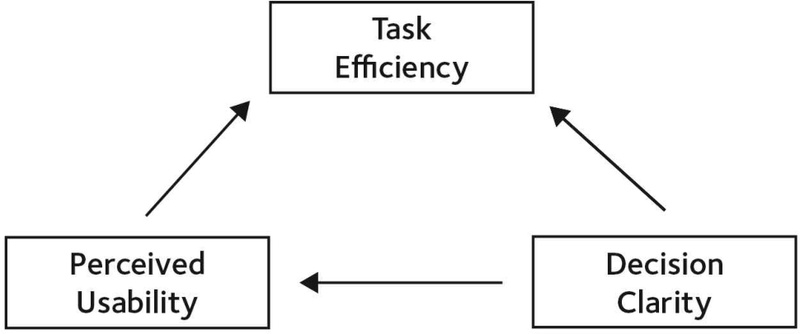
Preliminary conceptual model
The survey comprised 26 questions: demographics (Q1-2) assessed five age groups (18-24, 25-34, 35-44, 45-54, 55+) and kiosk usage frequency to contextualize participant profiles. The evaluation section (Q3-26) measured the three variables using a 5-point Likert scale. A table summarizing the survey questions and their corresponding variables is presented as follows (Table 1):

Survey questions
The survey’s reliability was assessed using Cronbach’s alpha, revealing high internal consistency across the constructs (overall α= 0.931 for 24 items, n=202). Specifically, Perceived Usability yielded α= 0.941 (6 items), with corrected item-total correlations (CITC) ranging from 0.800 to 0.840 and alpha if item deleted < 0.941, indicating strong item coherence. Decision Clarity showed α= 0.937 (11 items), with CITC from 0.700 to 0.780 and alpha if item deleted < 0.937. Task Efficiency had α= 0.912 (7 items), with CITC from 0.701 to 0.771 and alpha if item deleted <0.912. All CITC > 0.4 and α > 0.9 confirm excellent reliability. Validity was further supported by a Kaiser-Meyer-Olkin (KMO) measure of sampling adequacy of 0.941 (excellent) and Bartlett’s test of sphericity (χ² = 3301.658, df = 276, p=0.000), indicating the data’s suitability for factor analysis. Correlation analysis revealed strong positive relationships among the variables: Perceived Usability with Task Efficiency (r= 0.912, p < 0.01), Decision Clarity with Task Efficiency (r=0.937, p < 0.01), and Perceived Usability with Decision Clarity (r= 0.941, p < 0.01), providing initial support for the bidirectional model. These analyses, including planned regression and mediation assessments, were conducted using SPSS to ensure robust statistical processing.
3-2 Qualitative Case Analysis
The study analyzes interfaces widely used by time-constrained, diverse users with varying levels of digital literacy, focusing on the self-tax-refund kiosk at Incheon Airport, Seoul. The analysis examines four key design dimensions: (1) signifiers, including how clear buttons, labels, and colors guide user actions; (2) feedback, timely and interactive communication that directly affects users’ decision-making and cognitive state ; (3) constraints, digital limitations that serve as error prevention mechanisms; and (4) task efficiency, evaluating whether steps follow a logical, taskonomic sequence that aligns with the user’s mental model of the activity. By observing how these elements operate, this research assesses the choice architecture that facilitates goal-oriented tasks through the options presented and sequenced, and evaluates the usability and behavioral impact of design strategies in high-traffic, goal-directed environments.
3-3 Integrated Key Findings
The interface begins with a clear signifier - “Please select the language you want’ - displayed in 4 frequently used languages, determined through data-driven prioritization of common traveler demographics (Fig. 2). This is reinforced through multilingual text and visual redundancy, with large, high-contrast country flags prominently positioned at the top, serving as strong signifiers that visually guide users toward quick, intuitive decision-making. The 12 default language options are consistently labeled in multiple languages, nudging diverse users to identify their preferred language with minimum cognitive load. Quantitative analysis supports this, with Decision Clarity (α= 0.937), reflecting the effectiveness of signifiers in reducing cognitive load. The interface also embeds light constraints by requiring language selection before allowing progression, ensuring proper localization for subsequent steps.
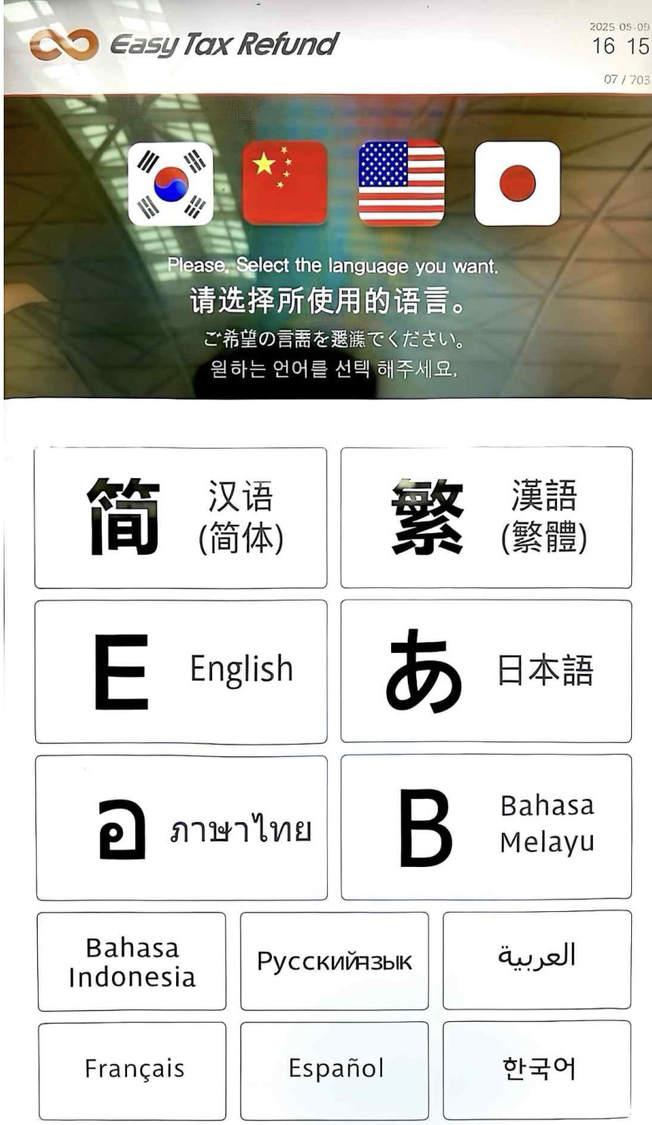
Step 1 - Language selection*to show different language options
The next step requires passport scanning and personal data consent (Fig. 3). The interface provides an explicit text signifier directing users to scan their passport and uses a visual diagram of the physical scanner layout as an effective signifier to guide correct user action. It also structures the required legal consent items as a checklist with immediate visual feedback in the form of checkmarks. This step is presented as a ‘simple default’ with pre-checked boxes (Fig. 3), along with the red color scheme, reinforcing situational awareness and task focus. Regression analysis confirms Task Efficiency (α= 0.912) is positively influenced by Perceived Usability (β= 0.236, p < 0.001, R²= 0.201), supporting the role of defaults and feedback in streamlining the processes. The interface logic aligns with task flows, guiding interactions and making the process more intuitive. The choice architecture also imposes constraints that prevent progress until the passport is scanned and all consent items are acknowledged, ensuring correct flow of the activity.
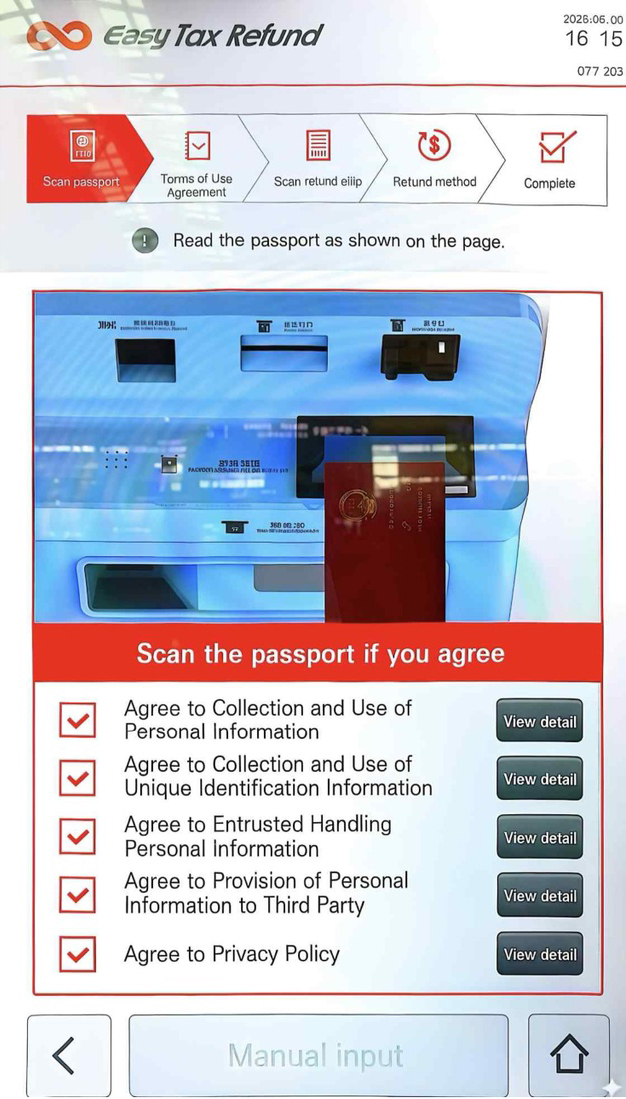
Step 2 - Passport scanning*Multiple languages shown in interface.
In the third step, users are prompted to scan their purchase receipts for tax refund eligibility (Fig. 4). The signifiers are action-oriented, guiding users with both text and imagery. The choice architecture is structured around the activity of submitting proof of purchase and is visually supported by a signifier, an on-screen image nudges users to scan the correct receipt placement and reduces ambiguity. This aligns with a strong correlation between Decision Clarity and Perceived Usability (r= 0.941, p < 0.01), validating the clarity of visual cues. Each successfully scanned receipt is displayed in a table format, providing real-time feedback on transaction details including receipt count, purchase serial number, refund amounts, and customs clearance status. The format, along with the logical signifiers and feedback, mirrors the design of a printed receipt, enhancing user comprehension through cognitive alignment. The ‘Scan Complete’ button functions as a ‘forced choice’ and is functionally gated, serving as both a constraint to prevent errors and a default to ensure process compliance.
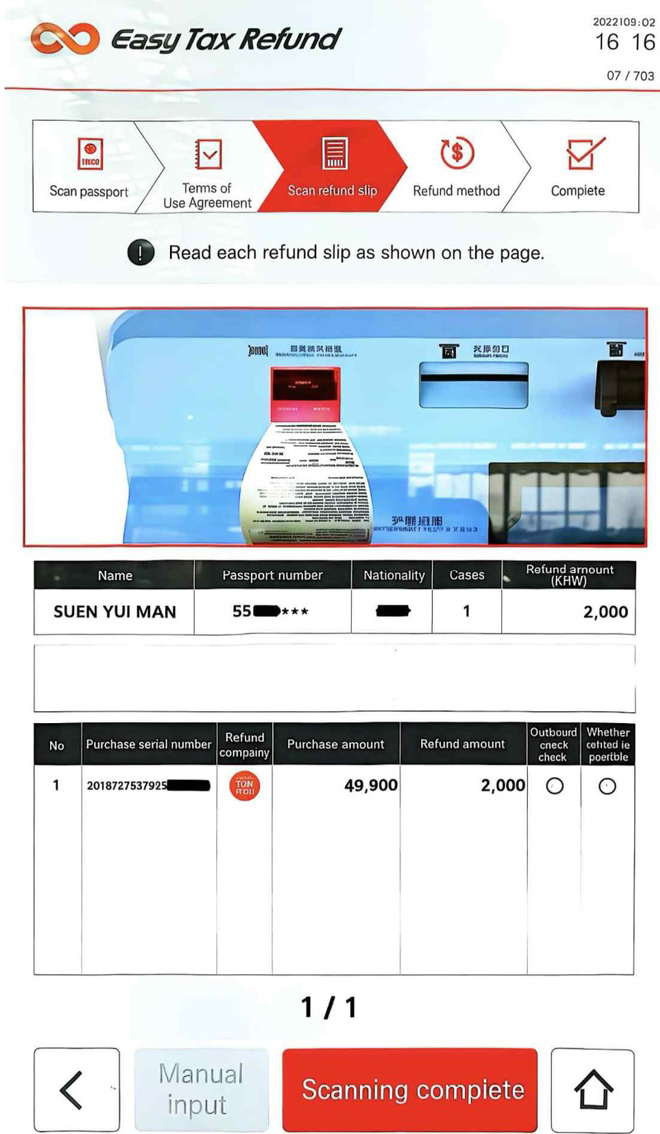
Step 3 - Purchase receipts scanning*Multiple languages shown in interface.
The main goal of the final step is to nudge users to select their preferred refund method (Fig. 5). The progress bar (Fig. 6) clearly indicates the last stage, labeled as the ‘Refund Method’ to help users stay aware of their position in the task sequence. This is supported by regression results showing Decision Clarity significantly predicts Task Efficiency (β= 0.257, p <0.01), highlighting the progress bar’s role in task flow. This process is guided by large, clear visual signifiers, including a currency icon and a recognizable payment platform logo. The choices are presented in a simple layout with minimal cognitive load, allowing users to quickly interpret the options. A confirmation pop-up prompt (Fig. 7) appears when users select cash as their refund method, providing clear multilingual instructions and a visual map as a spatial signifier to support orientation. The signifier also functions as feedback, confirming task completion and directing the next required action.
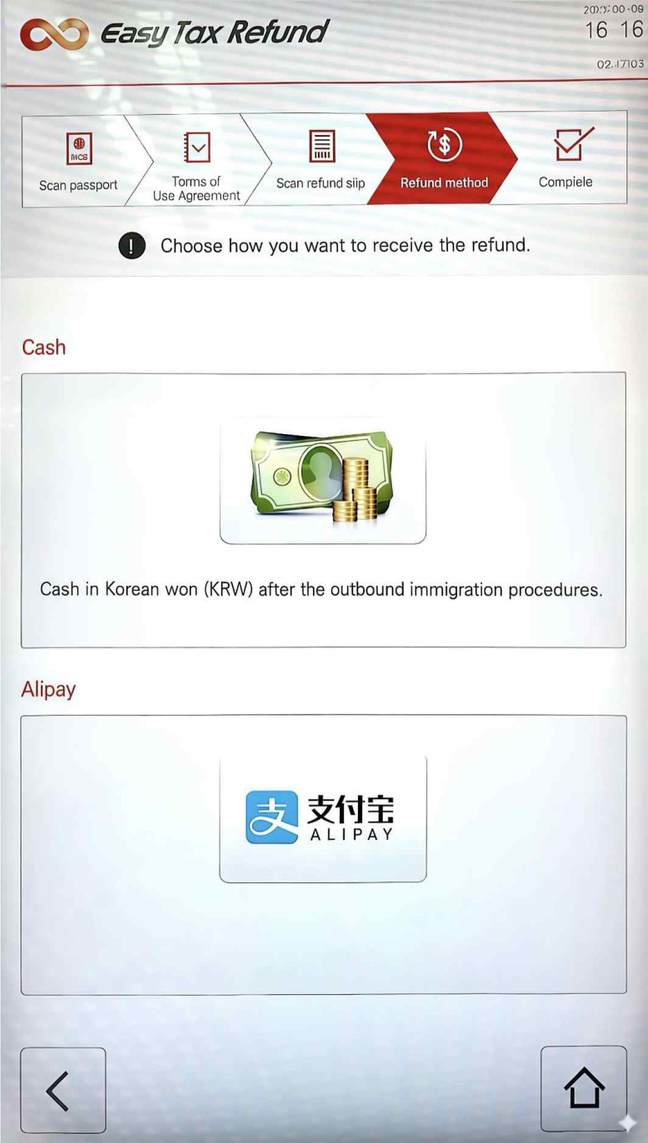
Step 4 - Refund method selection*display of payment options

Progress bar*multilingual instructions

Pop-up prompt
The case study above exemplifies how effective choice architecture, when integrated with clear signifiers, appropriate nudges, constraints and timely feedback can reinforce behaviors that aligns with intended activities. To empirically validate the preliminary conceptual model, the following hypotheses were tested through theoretical analysis (Table 2).
Hypothesis results
The results confirm all hypotheses (p <0.01), aligning with the strong correlations (r =0.912-0.941) and regression findings (R2= 0.201). This supports the bidirectional relationship, with mediation enhancing the model’s explanatory power for task completion in the kiosk interface. First, reducing choice overload as a nudge strategy is supported by high reliability (overall α= 0.931) and correlations (r= 0.912-0.941, p <0.01), indicating the minimalist interface enhances Task Efficiency by minimizing cognitive strain, as each additional choice demands additional time, and more options place a greater cognitive burden due to the additional need to evaluate options, potentially out-weighting the benefits of greater choice[3]. By structuring the choices with just enough and contextually relevant options, the interface minimizes decision friction while maintaining clarity of action, guiding users toward achieving task-oriented goals. Second, through default options and constraints, choice architects can exert influence over the resulting choices[3], validated by regression (R²=0.201), exert influence over choices. Defaults act as decision aids, especially when they align with what most users prefer when making an active choice[3]. This can be seen in design elements, such as the ‘simple default’ of pre-checked boxes in consent items, ‘forced choice’ to prevent incomplete submissions and restricting progression to the next step until an active choice is made. The ‘simple default’ strategy simplifies the process, enhances user flow and reduces hesitation, while the ‘forced choice’ mechanism ensures that users engage with necessary, critical steps, reinforcing procedural correctness. Together, the default options streamline the process for most users and provide guardrails to prevent errors, aligning with the ACD goal of structuring design around activities and minimizing unnecessary cognitive effort. Third, visual signifiers act as cognitive shortcuts, quantified by Decision Clarity’s strong impact (β= 0.360, p< 0.001), reducing dependency on prior experience or language fluency, allow low-effort decision-making through System 1. The strategic use of visual salience nudges users toward faster selection, reducing friction under time constraints. The progress bar, as a critical signifier and feedback mechanism, directly supports situation awareness. It visually reflects the taskonomic structure of the activity, enabling users to navigate the interface with greater ease. This brings to the fourth strategy – using taskonomic structure to align with the underlying activities. The interface follows a logical activity-based structure, employing a taskonomic approach that guides users through relevant steps, consistent with regression significance (p <0.001). The design aligns with task flow, presenting only the options and information relevant to completing the activity. Lastly, feedback mechanisms, supported by mediation (effect size = 28.6%), reinforce perceived control and task progress. Feedback such as checkmarks and confirmation pop-ups communicate task completion and support users’ mental model by closing the loop between user action and system responses.
3-4 Discussion
To further interpret the findings, Norman’s concepts of the Gulf of Execution and the Gulf of Evaluation provide an insightful lens for understanding how interface design either supports or hinders task performance.
The Gulf of Execution refers to the gap between a user’s goal and the means to execute it through the system. This occurs when the interface fails to communicate how required actions should be performed, leaving users to figure out how the system operates while trying to achieve their goals. Unclear instructions, ambiguous labels, or illogical task flows create friction that forces users to pause or backtrack. This gulf can be narrowed by designing interfaces that clearly and efficiently communicate required actions through nudging mechanisms such as visible signifiers, constraints and taskonomic sequencing, structuring options and interactions in a way that reflects the activity itself, and makes actions discoverable and logically aligned with the user’s goal.
The Gulf of Evaluation, on the other hand, refers to the gap between the system’s response and the user’s ability to interpret that response. ‘It reflects the amount of effort that the person must make to interpret the physical state of the device and to determine how well the expectations and intentions have been met’[1]. Immediate, meaningful feedback[1], such as confirmation messages or status indicators, not only narrows this gulf but also serves as a nudge, reinforcing correct behavior, enabling users to evaluate outcomes and reduce anxiety.
Designers, when acting as choice architects within an ACD environment, shift the emphasis from individual user preferences to the inherent, logical structure of activities themselves, This role involves shaping decision-making environments that predictably and positively influence user behavior and understanding of the system. Key competences requires for designers in this capacity include the followings. 1) Understanding user needs: ACD has a strong emphasis on understanding the common and goal-directed activities of users, designers must, therefore, analyze the ultimate motivations driving the activities of users. 2) Behavioral guidance through subtle interventions: implementing nudging mechanisms such as defaults, visual salience, progression indicators, to guide users without coercion. These nudges should be transparent rather than manipulative, while accommodating diverse proficiencies. 3) Error prevention and resilience design: effectively utilize design elements like signifiers for evaluation (perceptible cues for actions), feedback for evaluation (real-time responses to user inputs), and constraints for error prevention (limitations to prevent misuse) to foster task efficiency by making activities discoverable and recoverable.
Some critics argue on favor of education over nudging, believing that people’s decision-making abilities should be strengthened rather than shaped through choice architecture. However, many nudges are inherently educational, such as disclosures, warnings, and reminders are intended to inform users[2]. Design elements in choice architecture offer well-curated options and well-considered defaults that can be chosen and rejected freely by users. It is worth noting that while extensive research has examined how the number of options affects decision-making, balancing competing objectives makes it difficult to establish a universal guideline for the optimal number of choices to present. A practical recommendation, however, is to present 4 or 5 well-balanced, non-dominating options to encourage thoughtful evaluation without being influenced by too few choices[3].
Ⅳ. Conclusion
Choice architecture and nudging are indispensable aspects of user interface design, as any presentation of options inevitably influences decision-making. Designers, serving as choice architects, play a vital role by intentionally structuring interactions to guide users toward intuitive and beneficial outcomes. When interface flows align with the logical progression of tasks, users navigate effortlessly, experiencing minimal confusion and redundancy.
Through the strategic application of signifiers, constraints, and feedback, designers can subtly influence user behavior without compromising autonomy. These elements—when clearly defined, appropriately limited, and contextually placed—collectively nudge users toward rational, goal-directed actions that improve task efficiency and enhance the overall experience. Crucially, as highlighted in existing literature, presenting choices neutrally is largely impossible. As Thaler et al. assert, “It is impossible for a choice architect to avoid influencing people’s behavior”[3]. This reinforces the idea that every design decision carries weight.
Norman further emphasizes that “design is concerned with how things work, how they are controlled, and the nature of interactions between people and the technology”[1]. Designers must therefore shape ‘knowledge in the world’ by deploying cues that minimize cognitive load and support fast, intuitive decisions through System 1 thinking. This study reaffirms the designer’s ethical and practical responsibility in using choice architecture thoughtfully to empower users and facilitate seamless outcomes.
References
- D. Norman, The Design of Everyday Things: Revised and Expanded Edition, New York, NY: Basic Books, 2013.
- R. H. Thaler and C. R. Sunstein, Nudge: The Final Edition, New York, NY: Penguin Books, pp. 3-52, 2021.
-
E. J. Johnson, S. B. Shu, B. G. C. Dellaert, C. Fox, D. G. Goldstein, G. Haubl, ... and E. U. Weber, “Beyond Nudges: Tools of a Choice Architecture,” Marketing Letters, Vol. 23, pp. 487-504, June 2012.
[https://doi.org/10.1007/s11002-012-9186-1]

- W. Hagman, When Are Nudges Acceptable?: Influences of Beneficiaries, Techniques, Alternatives and Choice Architects, 1st ed. Linköping, Sweden: Linköping University, 2018.
-
P. G. Hansen, “The Definition of Nudge and Libertarian Paternalism: Does the Hand Fit the Glove?,” European Journal of Risk Regulation, Vol. 7, No. 1, pp. 155-174, 2016.
[https://doi.org/10.1017/S1867299X00005468]
-
L. Qu and P. Y. K. Chau, “Nudge with Interface Designs of Online Product Review Systems – Effects of Online Product Review System Designs on Purchase Behavior,” Information Technology & People, Vol. 36, No. 4, pp. 1555-1579, May 2023.
[https://doi.org/10.1108/ITP-11-2020-0802]
-
E. J. Johnson and D. Goldstein, “Do Defaults Save Lives?,” Science, Vol. 302, No. 5649, pp. 1338-1339, November 2003.
[https://doi.org/10.1126/science.1091721]
-
D. Leimstädtner, P. Sörries, and C. Muller-Birn, “Investigating Responsible Nudge Design for Informed Decision-Making Enabling Transparent and Reflective Decision-Making,” in Proceedings of Mensch und Computer 2023, Rapperswil: Switzerland, pp. 220-236, 2023.
[https://doi.org/10.1145/3603555.3603567]
- D. Kahneman, Thinking Fast and Slow, New York, NY: Farrar, Straus and Giroux, 2011.
-
Y. M. Suen and S. I. Kim, “An Analysis of the Impact of Visual Design on Way-finding and Signage: The Role of Colors in Enhancing Cognitive Navigation,” Journal of Digital Media & Culture Technology, Vol. 4, No. 2, pp. 131-146, December 2024.
[https://doi.org/10.29056/jdmct.2024.12.05]
-
T. O’Donoghue and M. Rabin, “Doing It Now or Later,” The American Economic Review, Vol. 89, No. 1, pp. 103-124, March 1999.
[https://doi.org/10.1257/aer.89.1.103]
-
D. A. Norman, “Human-Centered Design Considered Harmful,” Interactions, Vol. 12, No. 4, pp. 14-19, July 2005.
[https://doi.org/10.1145/1070960.1070976]
-
A. Jaimes, D. Gatica-Perez, N. Sebe, and T. S. Huang, “Human-Centered Computing: Toward a Human Revolution,” Computer, Vol. 40, No. 5, pp. 30-34, May 2007.
[https://doi.org/10.1109/MC.2007.169]
-
G. Gay and H. Hembrooke, Activity-Centered Design: An Ecological Approach to Designing Smart Tools and Usable Systems, Cambridge, MA: MIT Press, 2004.
[https://doi.org/10.7551/mitpress/1085.001.0001]
- Jnd.org. The Four Fundamental Principles of Human-Centered Design and Application [Internet]. Available: http://jnd.org/the-four-fundamental-principles-ofhuman-centered-design-and-application/, .
- Jnd.org. Logic versus Usage: The Case for Activity-Centered Design [Internet]. Available: http://jnd.org/logic-versus-usage-the-case-for-activity-centered-design/, .
- Jnd.org. Design as Communication [Internet]. Available: http://jnd.org/design-as-communication/, .
-
J. W. D. Dougherty and C. M. Keller, “Taskonomy: A Practical Approach to Knowledge Structures,” American Ethnologist, Vol. 9, No. 4, pp. 763-774, November 1982.
[https://doi.org/10.1525/ae.1982.9.4.02a00090]
-
Y. M. Suen and S. I. Kim, “Enhancing Communication in Human-computer Interfaces: Auditory Feedback Optimization,” Journal of Industrial promotion Research, Vol. 10, No. 2 pp. 485-494, January 2025.
[https://doi.org/10.21186/IPR.2025.10.2.485]
-
C. S. De Souza, The Semiotic Engineering of Human-Computer Interaction, Cambridge, MA: MIT Press, 2005.
[https://doi.org/10.7551/mitpress/6175.001.0001]
저자소개

2012:Bachelor of Design in Visual Communication Design, Griffith University, Australia
2014:Master of Business in Integrated Marketing Communication, Queensland University of Technology, Australia
2024~Present: Doctoral Student, Graduate School of International Design School for Advanced Studies (IDAS), Hongik University, Seoul, Korea
※Interest:Visual Communication, User Experience, Branding and Identity, Cognitive Engineering, Human-Computer Interaction

1987:Bachelor of Fine Arts (BFA) in Visual Communication Design, Department of Industrial Design, College of Fine Arts, Hongik University, Seoul, Korea
1997:Bachelor and Master of Fine Arts (BFA & MFA) in Film, Art Center College of Design, Pasadena, USA
2010:Doctor of Philosophy (Ph.D.) in Performing Arts, Interdisciplinary Program in Performing Arts, Graduate School, Sungkyunkwan University, Seoul, Korea
2001~Present: Professor of Digital Media Design, Graduate School of International Design School for Advanced Studies (IDAS), Hongik University, Seoul, Korea
※Interest:User experience Design, Brand Experience Design, Service Design